SwerveNerd
Slalom · Ski · Tracker

Log sets behind the boat.
See trends behind the data.

SwerveNerd is the slalom ski training tracker built for competitive skiers. Capture sets and passes in seconds, then export your data and let AI surface the patterns no spreadsheet would.


SwerveNerd app icon
Download on the App Store
Quick capture

Log every detail in just a few taps

Capture all your set details in less than 30 seconds.

Autofill your set for rapid entry or add pass-specific notes.

Set notes

Review notes from your successes and what you have been working on across all sets

All pass data and notes can be analyzed as your account history grows.

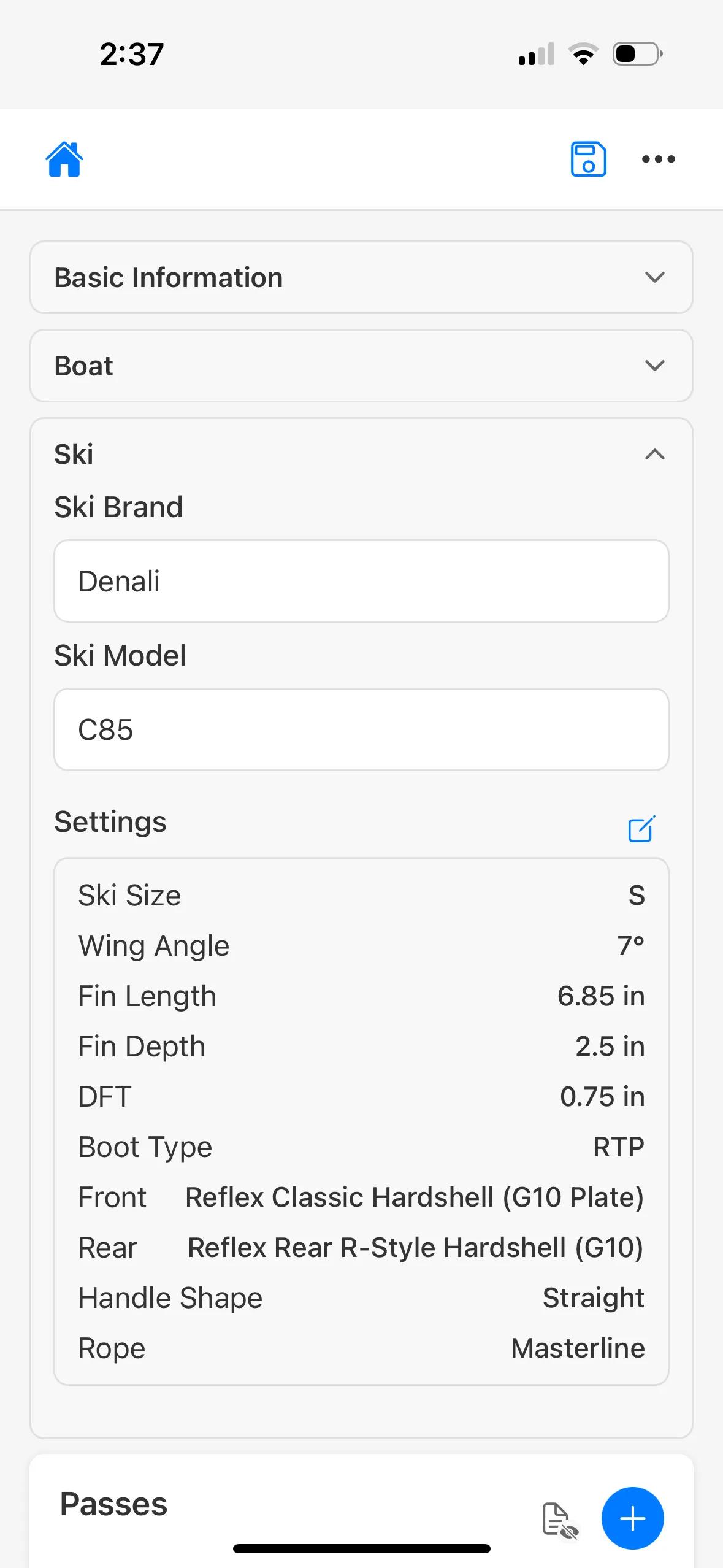
Equipment context

Every fin tweak, every binding swap, captured

Track exactly what impact an equipment change or fin move has on your performance.

Video review

Review and filter through videos of each pass

Match clips to the right pass and jump straight to the passes you want to see.

Customization

Customize your skier profile

Remove unused line lengths and boat speeds for speedier set logging.

Analytics

Analyze every detail across time

Watch trends build across seasons as your set history grows.

SwerveNerd set screen for Trophy Lakes with a lake map header and a pass list showing 34.2 mph runs at 32, 35 and 38 off with buoy counts, conditions and video.Set Notes screen listing nine sets with notes, each showing the date, buoy count, line length, boat speed and site.Ski settings panel showing Denali C85 with full fin geometry, Reflex bindings, and Masterline rope.Review Clips screen matching sixteen videos from one day to individual passes by line length and time.Edit Skier screen with country mode, open-rated and masters toggles, and per-line visibility settings.Analytics screen with a score-over-time chart comparing four skis, plus a practice-versus-tournament breakdown showing a 7.8 buoy gap.
Quick capture

Log every detail in just a few taps

Capture all your set details in less than 30 seconds.

Autofill your set for rapid entry or add pass-specific notes.

SwerveNerd set screen for Trophy Lakes with a lake map header and a pass list showing 34.2 mph runs at 32, 35 and 38 off with buoy counts, conditions and video.
Set notes

Review notes from your successes and what you have been working on across all sets

All pass data and notes can be analyzed as your account history grows.

Set Notes screen listing nine sets with notes, each showing the date, buoy count, line length, boat speed and site.
Equipment context

Every fin tweak, every binding swap, captured

Track exactly what impact an equipment change or fin move has on your performance.

Ski settings panel showing Denali C85 with full fin geometry, Reflex bindings, and Masterline rope.
Video review

Review and filter through videos of each pass

Match clips to the right pass and jump straight to the passes you want to see.

Review Clips screen matching sixteen videos from one day to individual passes by line length and time.
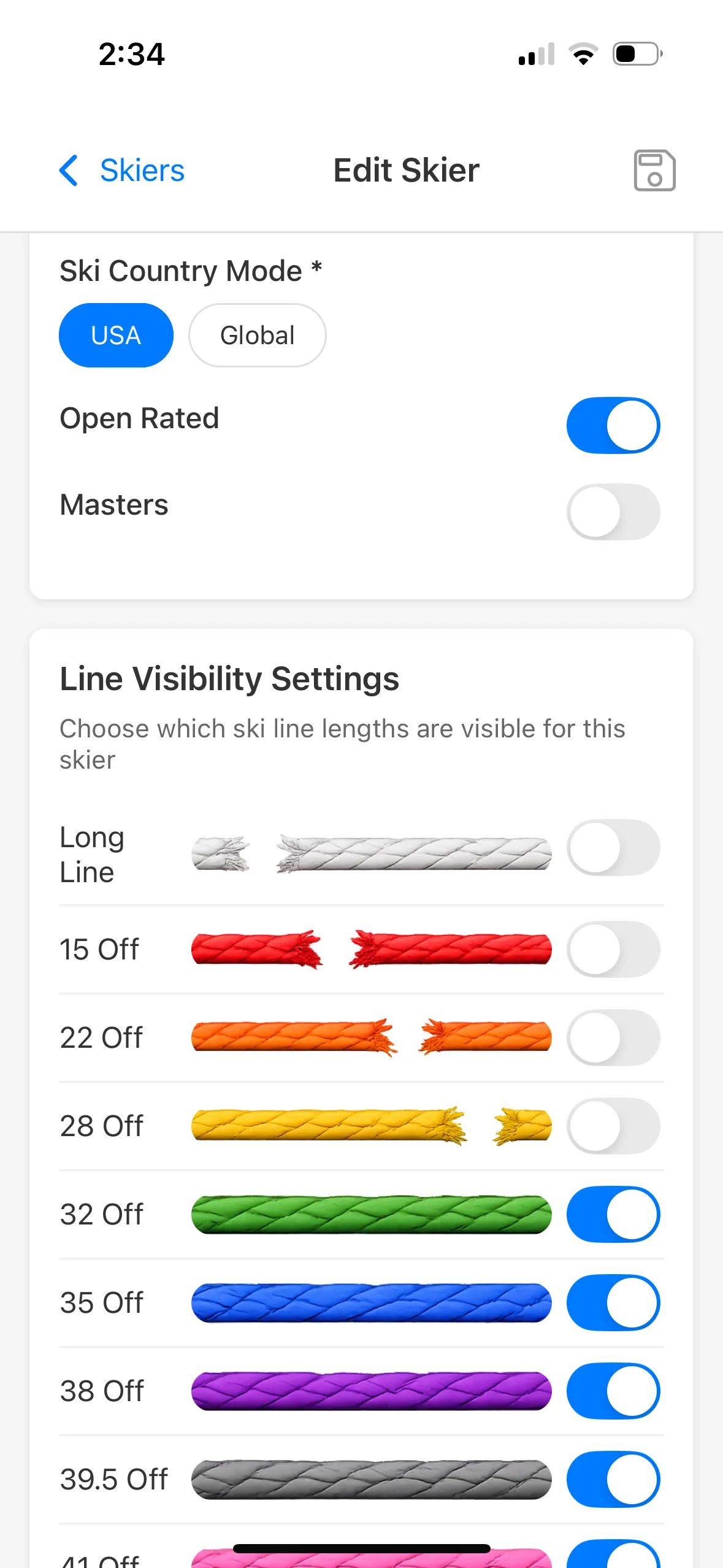
Customization

Customize your skier profile

Remove unused line lengths and boat speeds for speedier set logging.

Edit Skier screen with country mode, open-rated and masters toggles, and per-line visibility settings.
Analytics

Analyze every detail across time

Watch trends build across seasons as your set history grows.

Analytics screen with a score-over-time chart comparing four skis, plus a practice-versus-tournament breakdown showing a 7.8 buoy gap.

Cloud sync, no fuss

Sign in with Apple or Google. Your sets follow you across devices, no manual backups, no spreadsheet to lose.

Notes that survive the season

Set-level and pass-level notes are searchable later — that one tweak you tried in July is still findable in October.

In-app analytics

See the story your
season is telling

Every set you log becomes a trend you can actually read — best pass over time, buoy counts by line length, and the equipment tweaks that moved the needle. Spot the patterns behind your season without ever opening a spreadsheet.